Full Case Study
Caremap
Empowering collaboration between families and care providers, a mobile app designed to connect seniors, families, and home care professionals through a seamless, trust-building experience built from deep qualitative research.
Context
“Canadian families are increasingly hiring paid companion keepers and care providers to support relatives living at home.”
— Alex Mihailidis, University of Toronto Professor & Scientific Director, AGE-WELL
The Problem
Millions of Caregivers, No Efficient Way to Connect
uCarenet is a HealthTech social enterprise with a clear mission: helping seniors and palliative patients stay in their homes longer. To do that, they needed a comprehensive platform that could bridge two groups who desperately needed each other, care providers looking for clients, and families searching for trusted, qualified help.
An early version of the Caremap website gave families and providers a place to meet, but it wasn't working. Conversion was too low. Families couldn't filter by the things that actually mattered to them, location, language, specific care needs, and had no reliable way to build trust before committing. Care providers, meanwhile, had no structured way to present their availability or qualifications, leaving both sides of the marketplace underserved.
The experience was too fragmented to serve the scale of the real-world problem. What uCarenet needed wasn't a patch, it was a purpose-built platform designed from the ground up around how care is actually found, arranged, and managed.
01, Research
A Growing Need with No Good Solution
Millions of individuals provide care to senior family members or friends, averaging 19 hours monthly. With increasing life expectancy, demand is rising rapidly. A research workshop brought stakeholders together to establish direction and define business and design objectives before any solution was considered.
The existing Caremap website operated as a marketplace but suffered from low conversion rates, a clear signal that the experience wasn't serving its users. The solution: a mobile app with deeper functionality and a purpose-built UX.
Research Methodology
Research Insights, 2012 Statistics Canada Study
5.4M
Canadians providing care to senior family members or friends
3M+
Ontarians serving as family caregivers
0%
of caregivers care for a parent or in-law
0K+
spend over 10 hours weekly caring for a senior
0 hrs
average monthly hours of care provided per caregiver
9 in 10
seniors prefer to remain in their own homes as they age
Target User Groups
Care Providers
Healthcare professionals, nurses, PSWs, and companions, seeking employment and a reliable platform to manage their client relationships and availability.
Families
Family members of seniors seeking reliable, qualified home care providers, including families in different cities or overseas with seniors in Toronto.
Seniors
Seniors themselves who want to maintain their independence and quality of life at home, with access to personalised care and monitoring features.
Interviewing Both Sides of the Equation
Working with George Brown College field experts gave me direct access to core users. I wrote two separate interview guides and interviewed both groups, families and care providers, because a marketplace only works if I understood the motivations, pain points, and workflows on both sides of it.
Group 01
Families with Seniors
- Q01
What is the context?
- Q02
How often does your senior need help?
- Q03
What do they need help with?
- Q04
How often do you hire home care providers?
- Q05
What is the best-case scenario? And worst?
- Q06
What tools do you currently use?
- Q07
What are the major problems faced?
- Q08
Do you take care of your senior yourself or with someone else?
Group 02
Care Providers (RN & Nursing Students)
- Q01
What is the context?
- Q02
How do you find patients / clients?
- Q03
What tools do you currently use?
- Q04
What does your typical workflow look like? What are your major tasks?
- Q05
How many clients / visits do you usually have a day?
- Q06
Do you overwork?
- Q07
Have you had any issues with patients or their family members?
- Q08
How much preparation does your shift require, and what do you need to do after leaving?
- Q09
What are the major problems faced?
Observations
Beyond interviews, I observed nurses' workflows and technology use in practice. Canadian healthcare privacy regulations limited direct workflow observation, so I adapted the method, focusing on reporting practices, the primary tools in use, and the communication patterns between providers and care seekers.
02, Define
User Personas
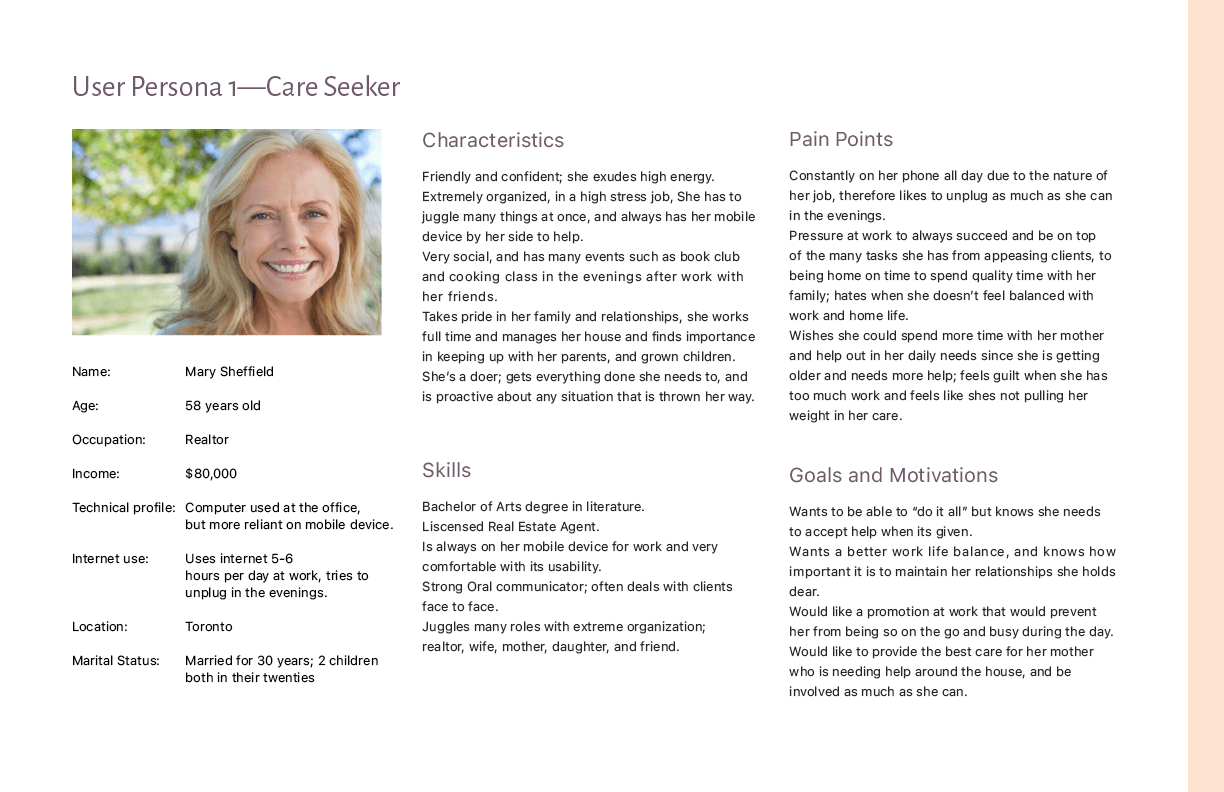
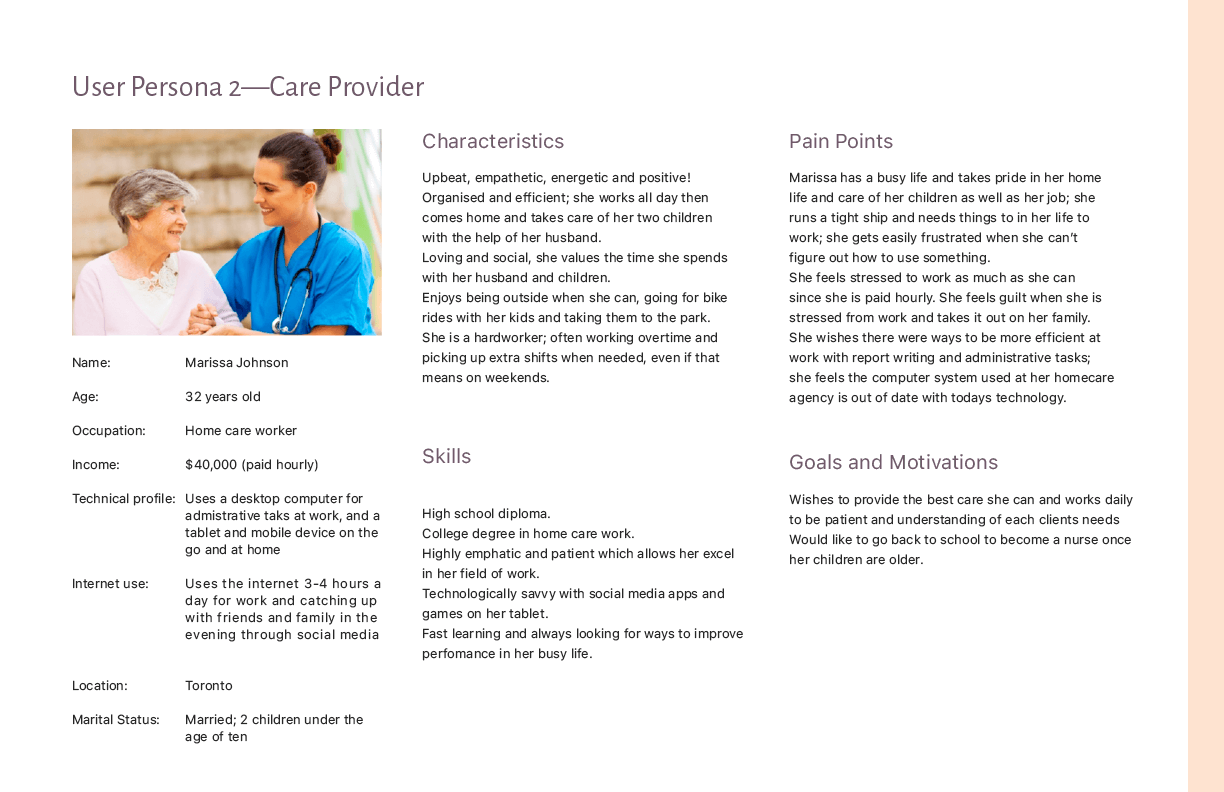
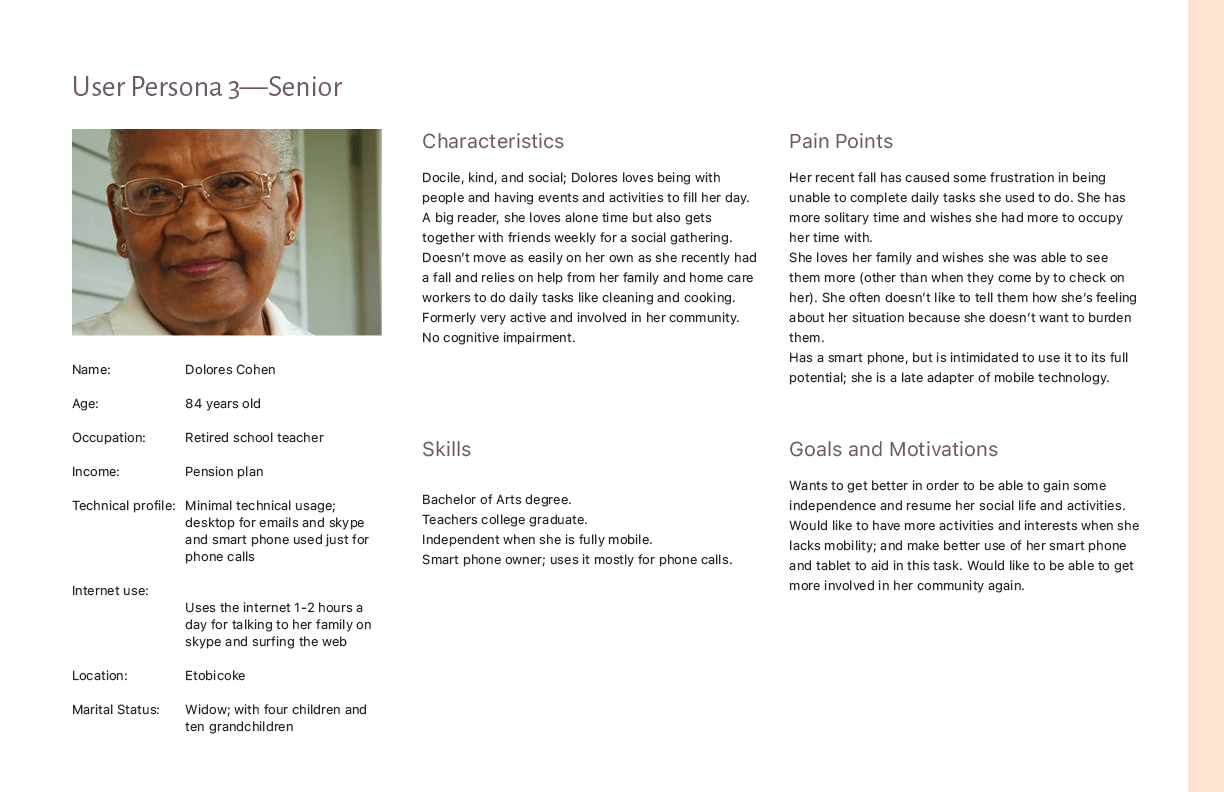
With the data gathered and goals defined, I built user personas to anchor the target audience and their motivations and needs. The personas became the tie-breaker during feature brainstorming, every proposed functionality had to trace back to a real person and a real need, or it didn't make the cut.
Problem Space
Main Pain Points
Tedious manual reporting system
Friction in sharing patients information
Time consuming admin work outside of paid hours
Frustrations in knowing seniors emotional and physical wellbeing
Difficulties in building trust between family members and care providers
Multiple time schedules with different care providers
03, Architecture & Flow
Two Users, One App, One Onboarding
The pivotal architecture decision: I consolidated what began as two separate apps into a single app with a branched onboarding. One entry point asks who you are, then routes families and providers into distinct but complementary flows.
Why one app, not two: a care marketplace only has value when both sides show up, and two separate apps would have split the network and doubled the build. I mapped a full flow diagram for each user type before designing a single screen, so the shared architecture held up for both.
Family Flow
Search for care providers by location, specific needs, and languages. Browse provider profiles, review availability, and book sessions directly through the app.
Care Provider Flow
Create and maintain a profile listing availability and service offerings. Receive booking requests, manage schedules, and communicate directly with care seekers.
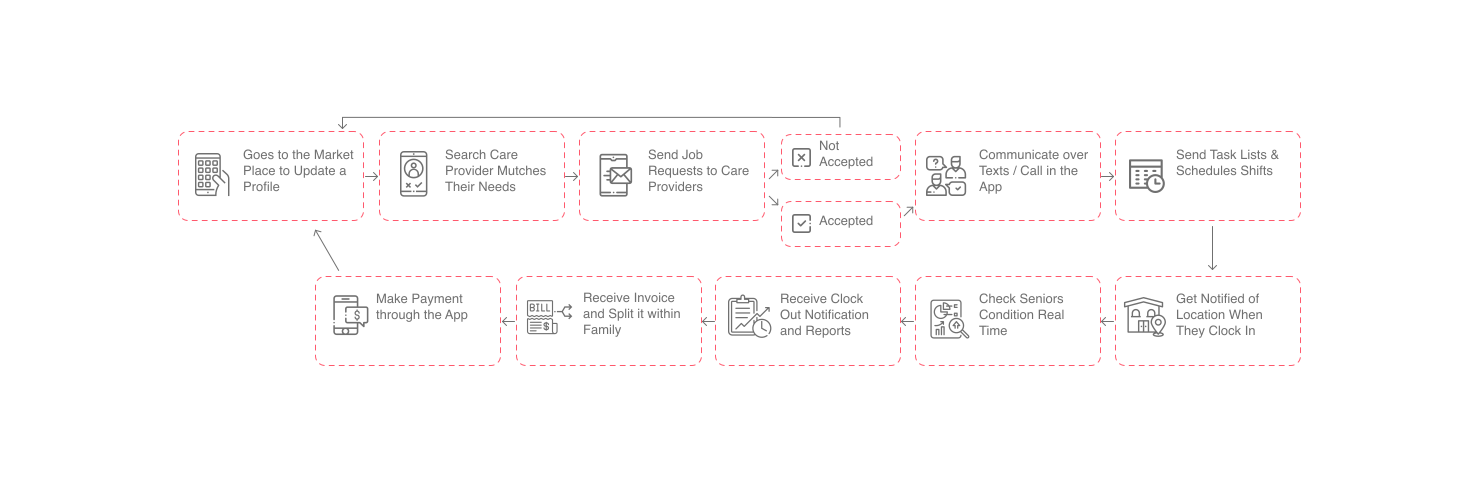
Family flow: search, filter, browse profiles, and book a session.
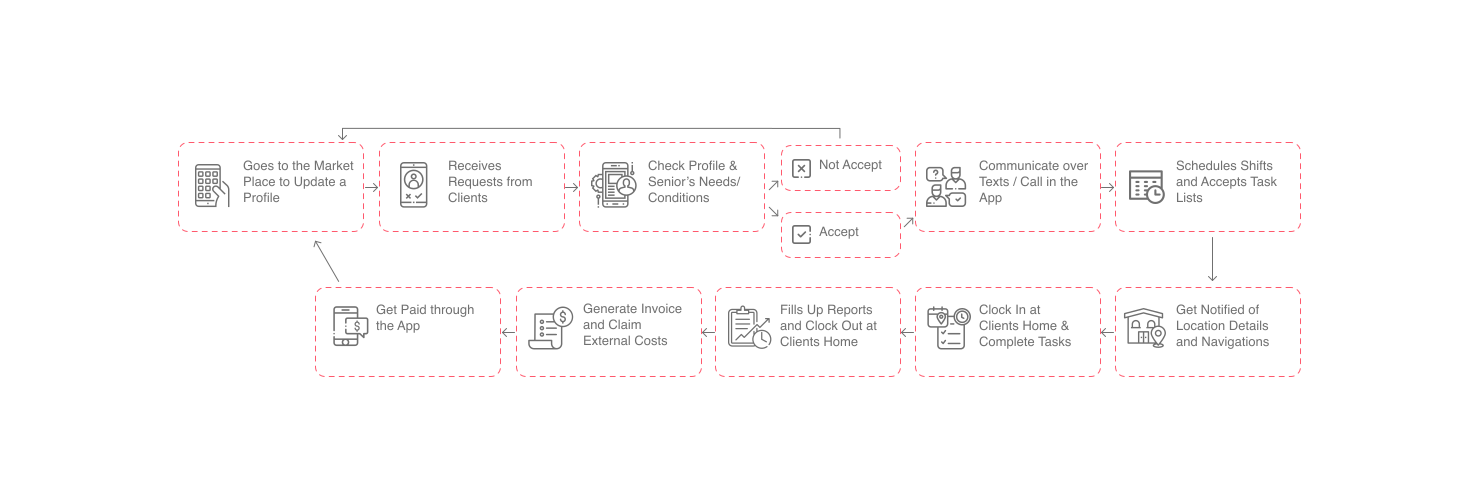
Provider flow: build a profile, set availability, and manage bookings.
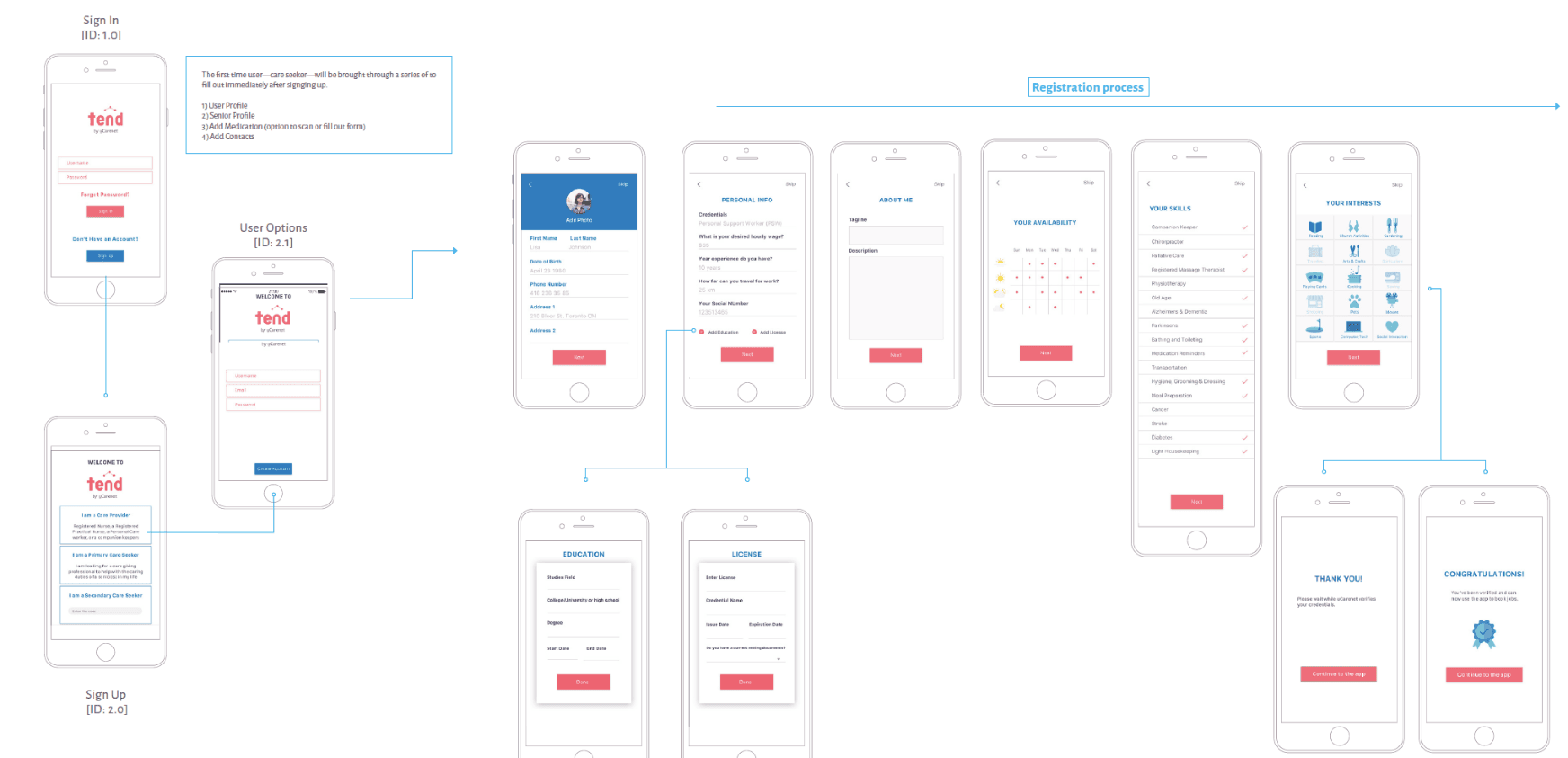
Care Providers On-boarding
A structured onboarding flow guides care providers through profile setup, availability configuration, and service listing. Each step is designed to reduce drop-off and build the credibility families rely on when making care decisions.
04, Design
A New Identity for a New Experience
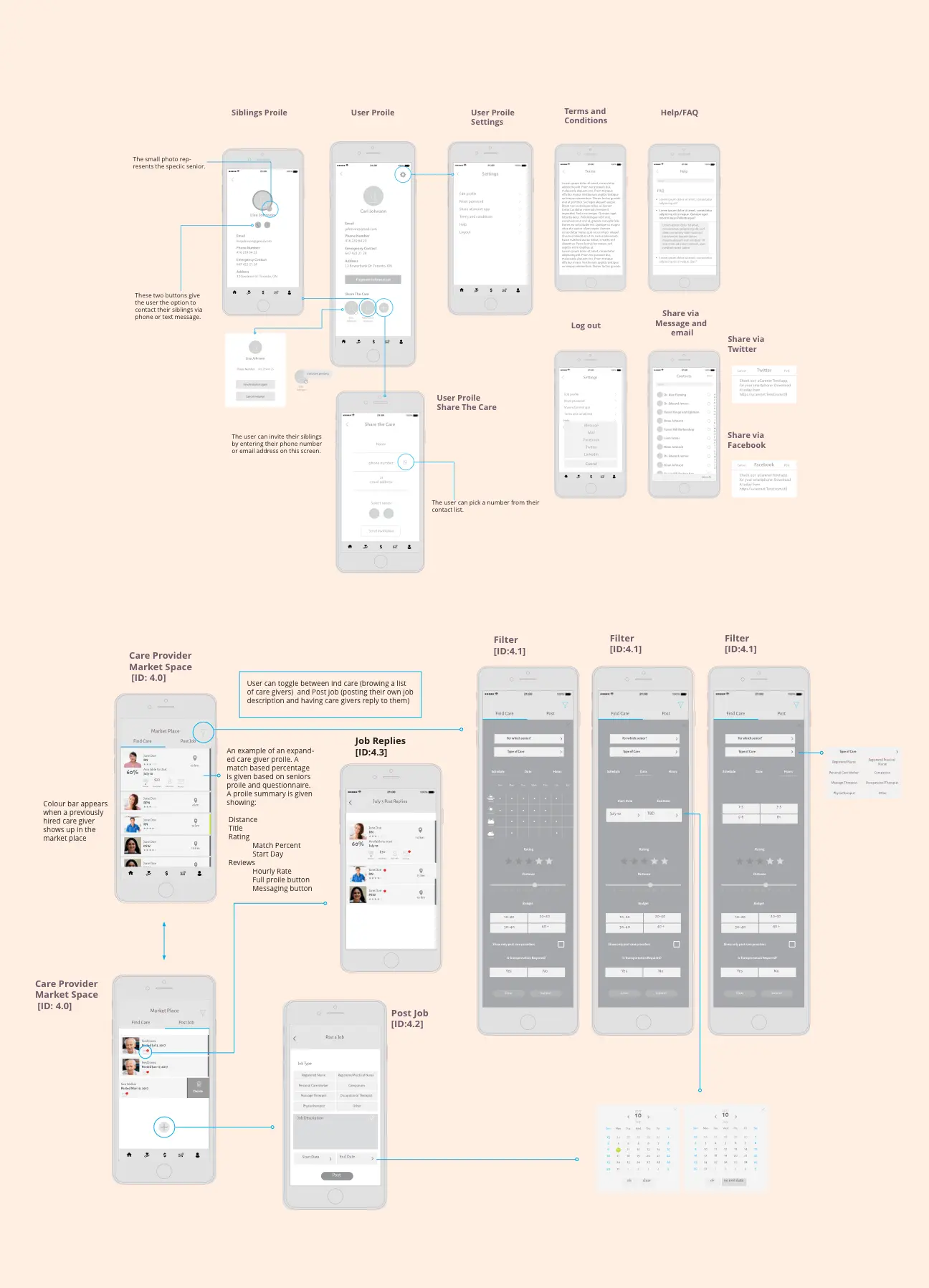
I developed a fresh brand identity for the app, distinct from the parent uCarenet brand, so it could stand on its own in a competitive market. I started in low fidelity to lock the structural logic of each screen and gather client feedback on the site map before any visual polish.
Designing for an Older Audience
Accessibility drove the visual decisions, not aesthetics. Because seniors and busy families are core users, I prioritised a large, legible type scale, high text-to-background contrast, and generously sized touch targets, so the interface stayed usable for older eyes and hands, not just attractive in a portfolio shot.
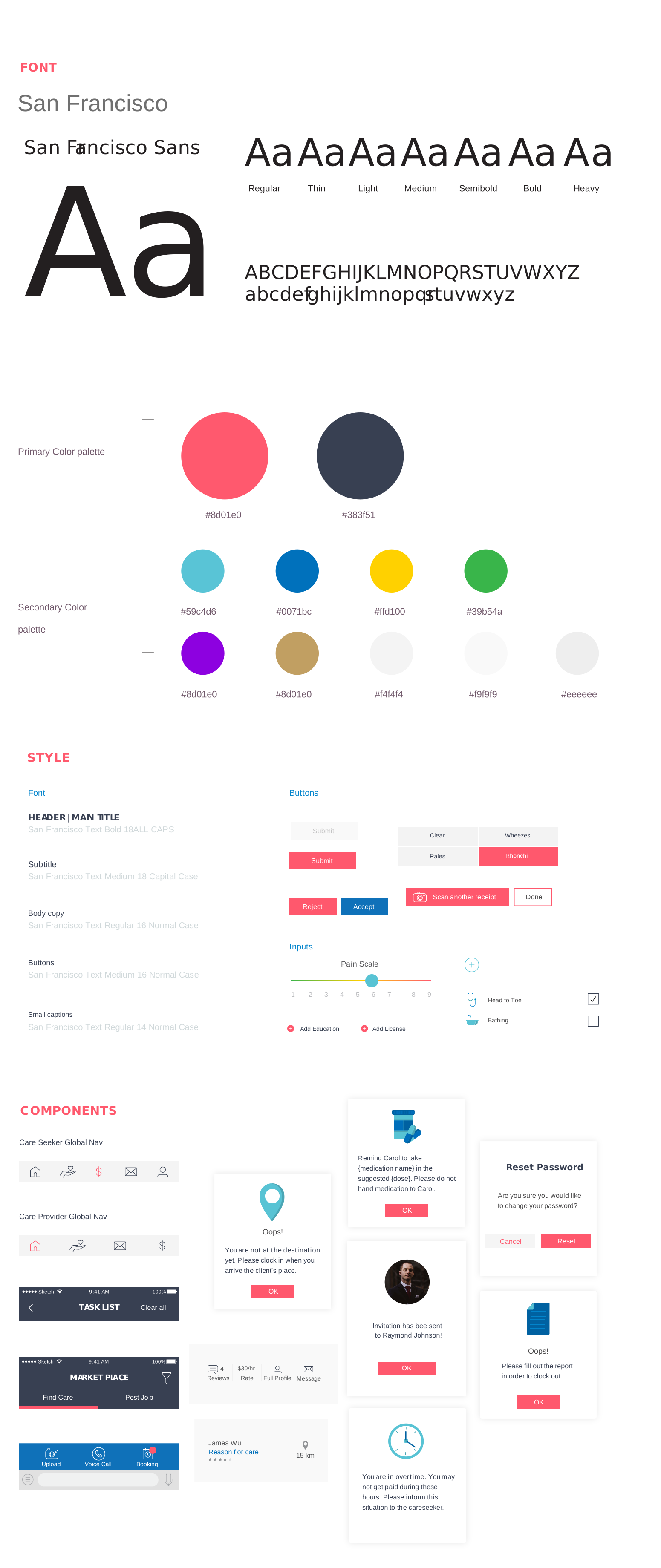
The Caremap design system: type scale, colour, and components tuned for legibility across seniors, families, and healthcare professionals.
Low-Fidelity
Low-fidelity wireframes presented initial plans and gathered client feedback on site mapping, establishing the structural logic of every screen before visual design began.
High-Fidelity
High-fidelity wireframes described functionality for each section, supporting prototyping and developer familiarisation, the bridge between design intent and technical implementation.
05, Deliver
Care, Connected
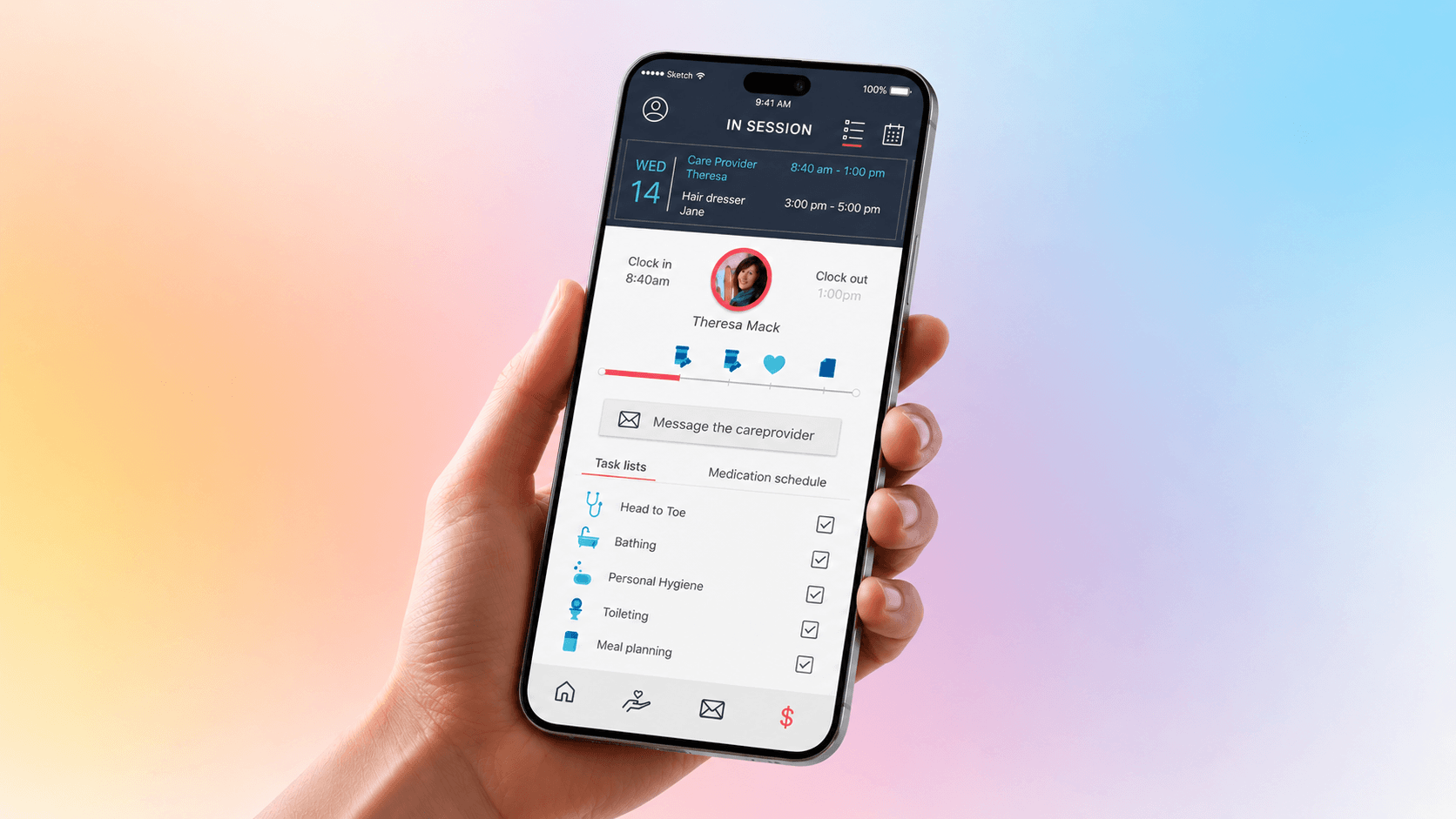
The final Caremap mobile app brought together families, seniors, and care providers in a single platform, replacing the low-converting website experience with a purpose-built mobile product designed around real workflows and real needs.
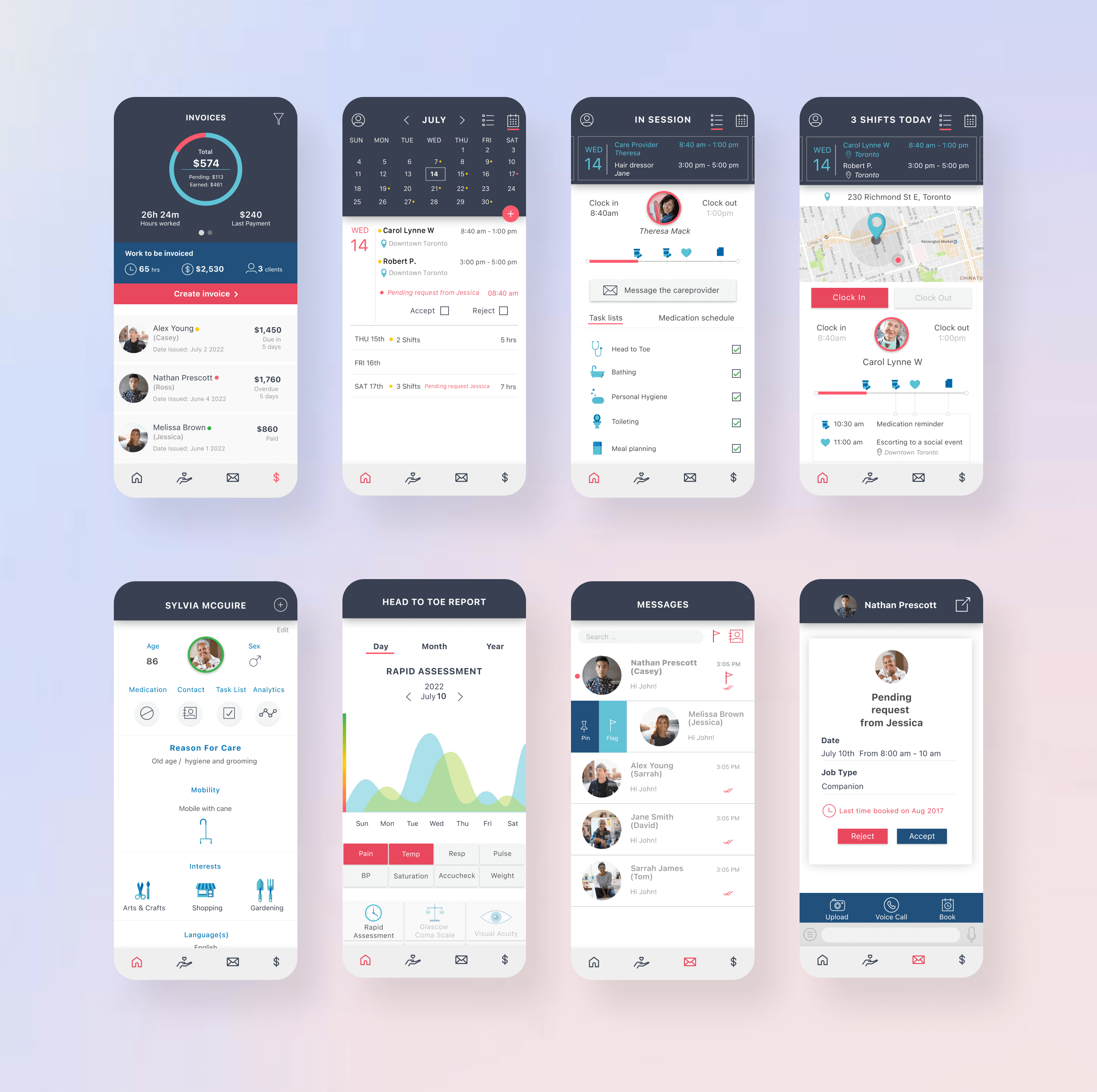
Core Features
Session Scheduling
Quick, simple session scheduling with care providers, a core conversion flow redesigned from the existing website to remove every unnecessary step.
Health Monitoring
Senior health condition monitoring capability, giving families peace of mind and care providers the context they need to deliver personalised care.
In-App Messaging
Direct provider contact via in-app messages and phone calls, keeping all communication within a single, trusted platform.
Provider Discovery
Browse the care provider work list by location, language, speciality, and availability, with rich profiles to support confident decision-making.
Outcome & Scope
I shipped v1.0 serving the two sides that unblock the marketplace, families and care providers, and deliberately deferred the senior health-monitoring experience to a scoped v2.0 rather than diluting the launch. The design directly addressed the low-conversion failure of the original site: families can finally filter by location, language, and specific care needs, and providers can present verified availability and qualifications, the two trust gaps the research surfaced.
2
User groups fully served at v1.0 launch
1
Unified app replacing the low-converting website
v2.0
Senior monitoring scoped for the next release
Caremap was a research-and-design engagement; v1.0 was validated with target users before handoff. Live conversion impact is owned by uCarenet post-launch.
What I Learned, Click to Expand
“Design transcends aesthetics and trend-following, it prioritises user interaction and usability. Understanding users, their problems, and designing solutions that address those problems is what truly matters.”