Full Case Study
FitMyLife
A mobile app applying in-depth metabolic and nutritional science to help users reach their fitness goals. A complete redesign of user flow, usability, and interface, driven by Lean UX, rigorous research, and iterative testing.
My Role
Redesigning the Experience, End to End
As Product Designer, I owned the FitMyLife redesign end to end, research, UX, UI, the UX audit, prototyping, and testing, working solo across the whole process under a Lean UX and Design Thinking approach.
I worked closely with the founding stakeholders in a joint workshop to align on goals and surface pain points, then pressure-tested design directions with a nutritionist, a personal trainer, and a data analyst who understood the domain I was designing within. Three external UX experts ran an independent heuristic audit to surface issues the core team had gone blind to, and I partnered with engineering throughout to stay inside the bounds of a fixed development framework.
The redesign lifted conversion and retention while finally making the metabolic science behind the app reachable for the people it was built for.
Product Designer · Cross-Disciplinary Collaboration
The Stakes
Great Science, Losing Users at the Front Door
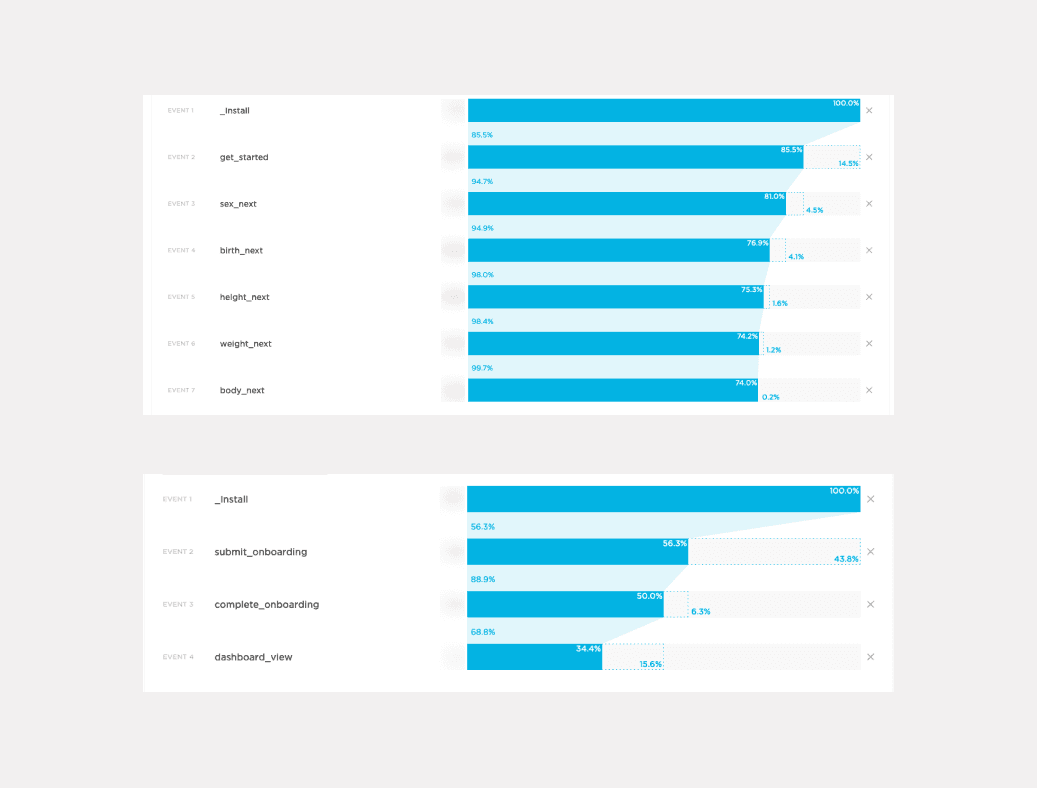
After nearly a year live, FitMyLife had a retention and conversion problem, not a science problem. The analytics told a sharp story: users were dropping out before they ever reached the value, abandoning onboarding and the premium upgrade where the experience was most confusing. My job was to make the metabolic science the app was built on actually reachable, so paying users could form a habit instead of bouncing at setup.
The Challenge, Click to Explore
Methodology
Lean UX + Design Thinking
This approach is an ongoing iteration-dependent process built upon measurable goals with research as the main focus, combining the speed of Lean UX with the empathy-driven rigour of Design Thinking.
01, Learn
Understanding Users Before Touching the UI
The app had been live for nearly a year, so I started with evidence, not opinion. I ran competitive analysis, dug into the real analytics, aligned stakeholders in a workshop, and observed users directly, deliberately understanding what was actually happening before touching the UI.
I also worked within a hard constraint: a pre-existing development framework limited what was buildable, so I assessed every decision for technical feasibility as I went, designing with engineering reality in mind rather than around it.
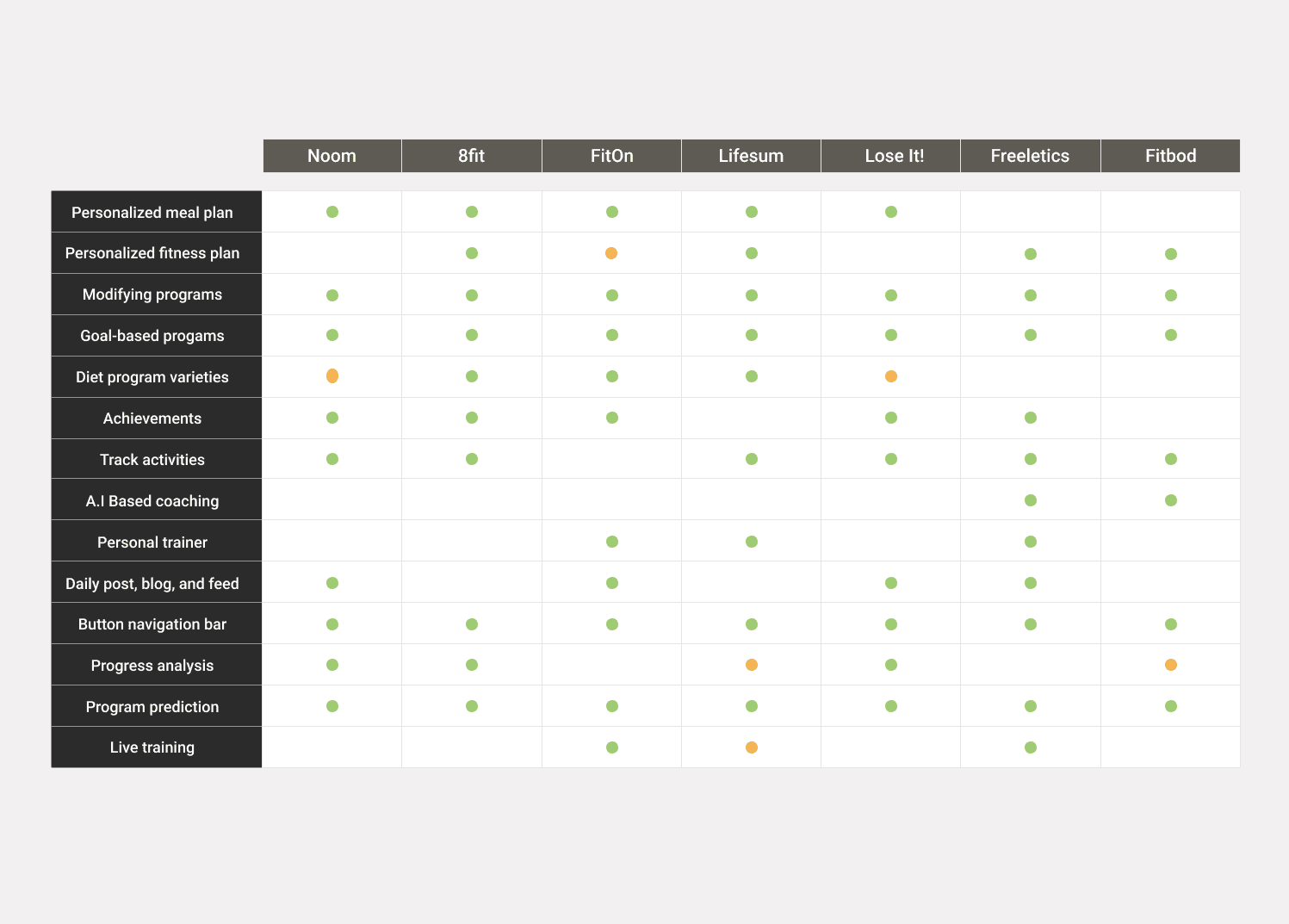
Competitive Analysis
Two-stage analysis: direct competitors with similar features, and adjacent competitors with potentially valuable features. Subscribed to premium tiers to access complete feature sets and capture the full picture.
Analytics Review
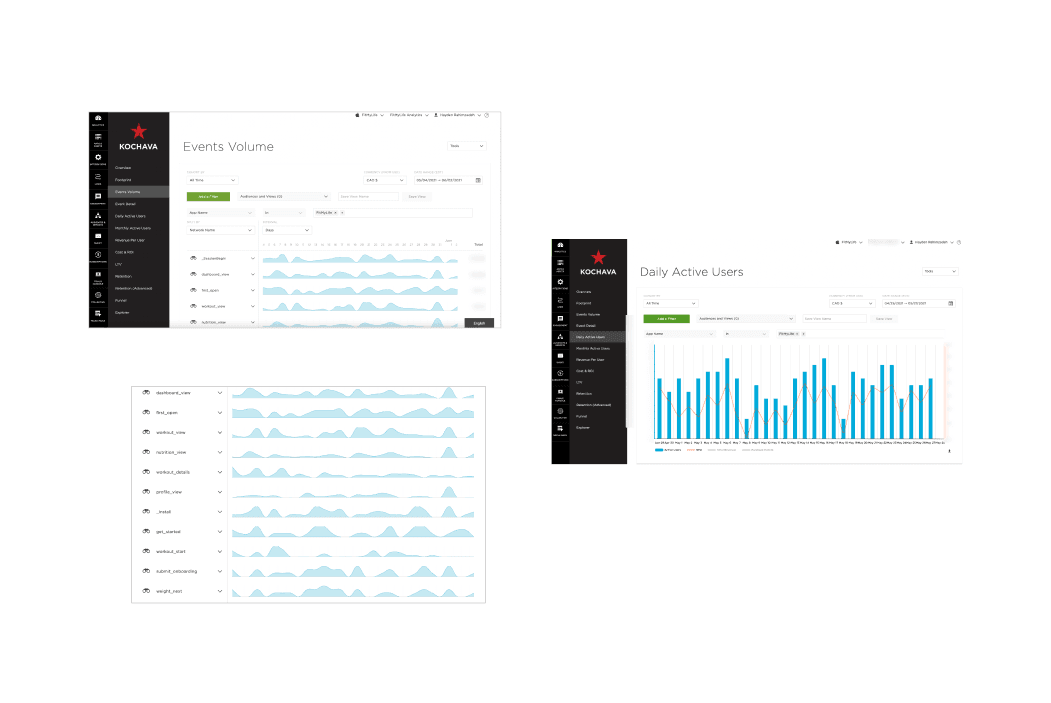
Analysed historical data from the existing FitMyLife app using the Kochava mobile attribution platform to identify user experience issues and dropout points in the product funnel.
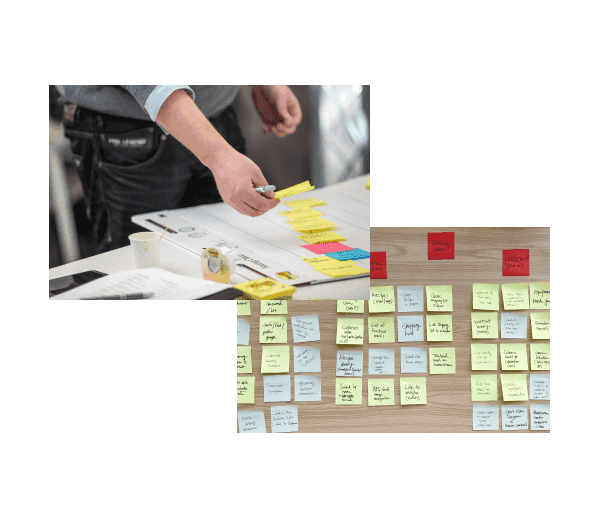
Stakeholder Workshop
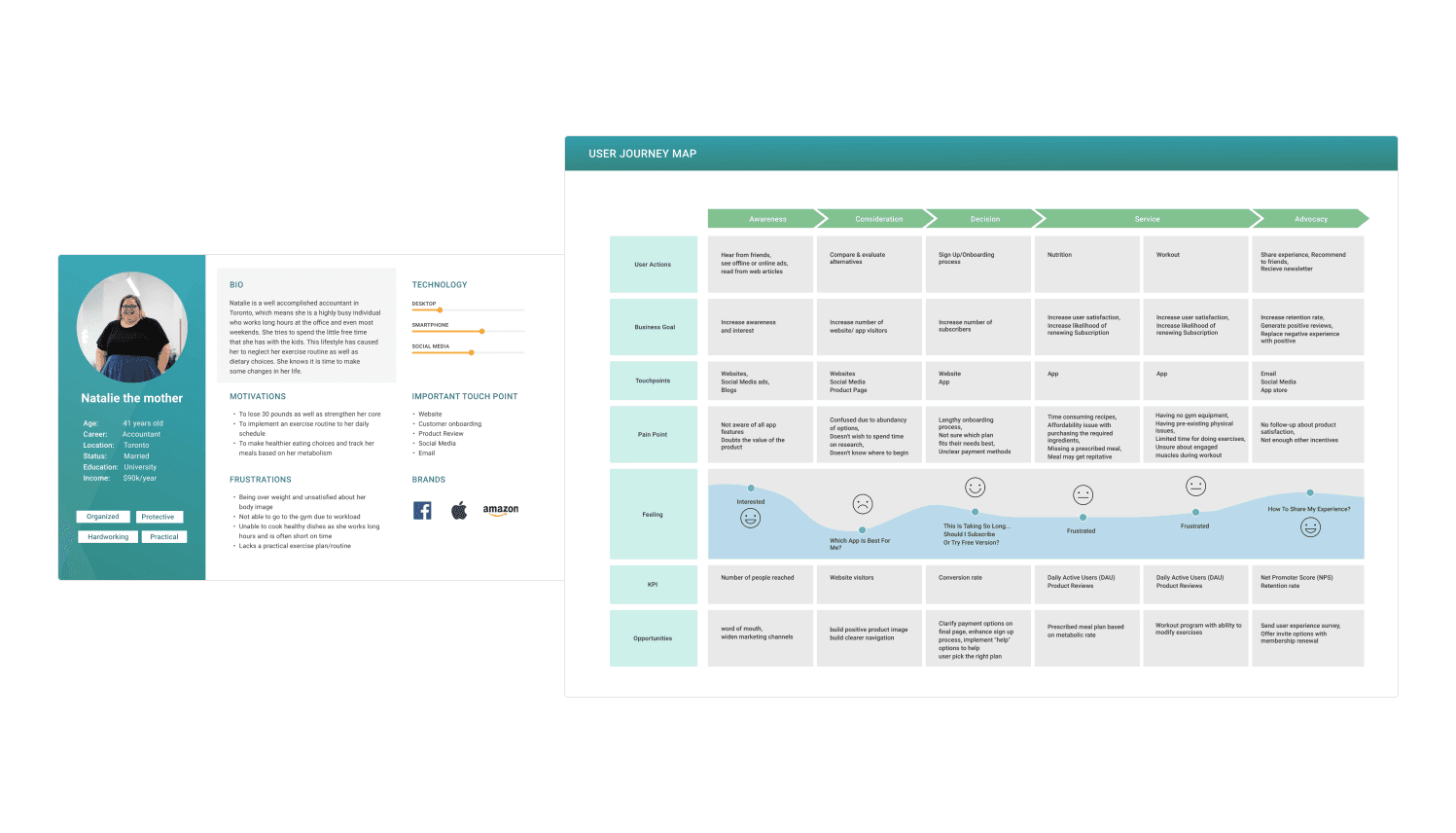
Defined app goals, business and user objectives, and created iteration outlines. Using post-it notes and rough sketches, the team identified target audiences, pain points, and created Personas and User Journey Maps.
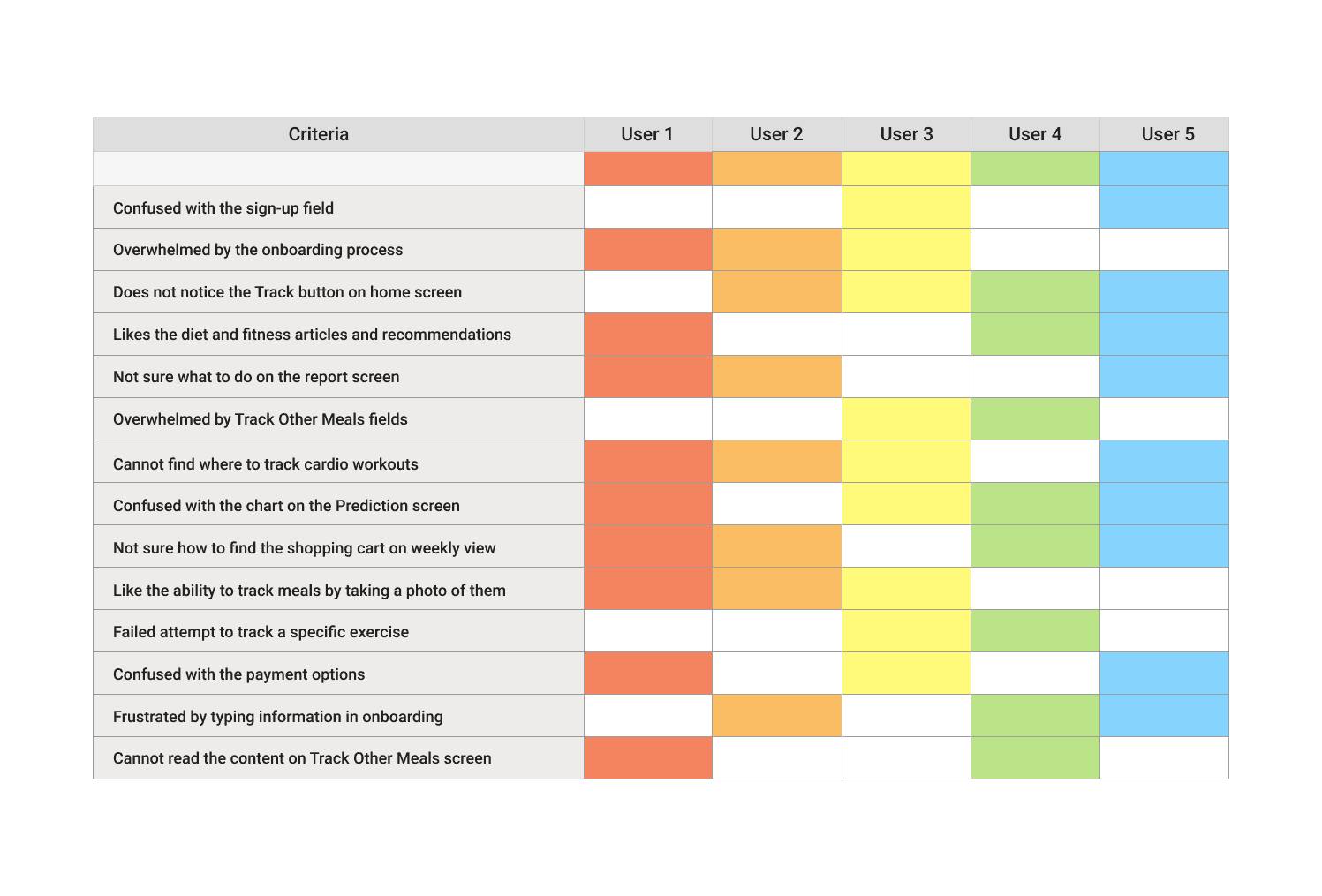
Rainbow Spreadsheet
Initial usability testing with 5 participants to identify current usability flaws. Behavioural patterns were recorded in a rainbow spreadsheet to translate qualitative data into quantitative format.
Empathy First
Mapping the Human Behind the Habit
I synthesised the research into a composite persona representing the core FitMyLife user, someone motivated but overwhelmed, who needs clarity and confidence more than complexity. It became the tie-breaker for every later trade-off.
The journey map then traced their full experience: from the frustration of an unclear onboarding flow to the moment a well-designed interaction finally makes the science feel approachable. Every design decision that followed was anchored to this arc.
02, UX Audit
Heuristic Evaluation by 3 Experts
I brought in three external UX experts to evaluate the app against Nielsen Norman Group's 10 usability heuristics, specifically to surface issues the core team had gone blind to. The recurring offenders clustered around three heuristics: visibility of system status, consistency & standards, and recognition over recall, which is exactly why users lost their place mid-flow. That gave me a ranked list to design against.
Evaluated Against, NN/g 10 Usability Heuristics
Visibility of System Status
Match Between System & Real World
User Control & Freedom
Consistency & Standards
Error Prevention
Recognition Rather Than Recall
Flexibility & Efficiency of Use
Aesthetic & Minimalist Design
Help Users Recover from Errors
Help & Documentation
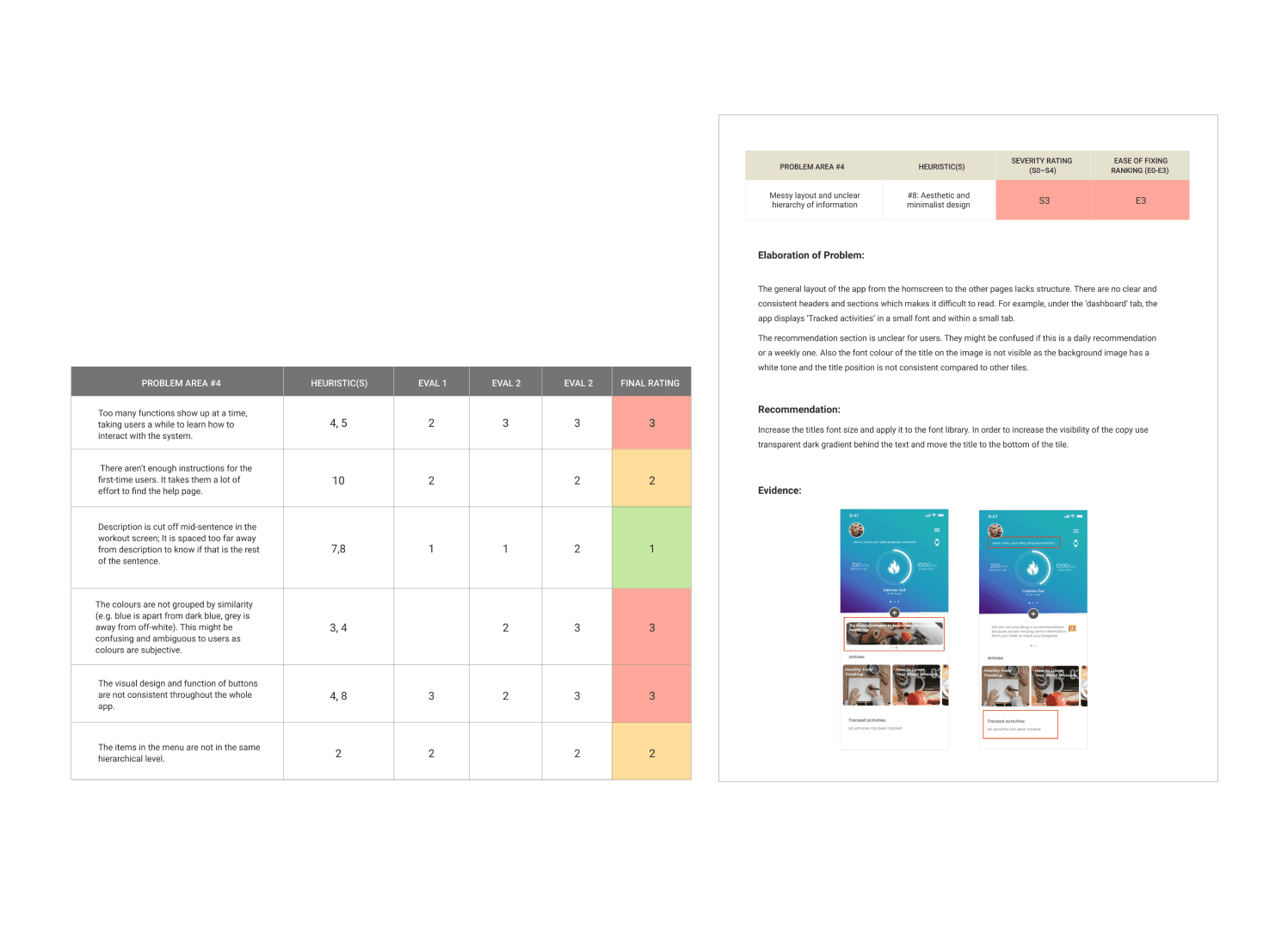
Evaluators scored each screen against the 10 heuristics; I ranked the violations by severity to decide what the redesign tackled first.
03, Build
From Sketches to Validated Prototypes
I sketched rapidly against the research, then pressure-tested each direction with the people who understood the domain and the constraints, a nutritionist, a trainer, and a data analyst. I wireframed the highest-impact screens first to prove out functionality and find the development limits before investing in high fidelity.
Wireframes
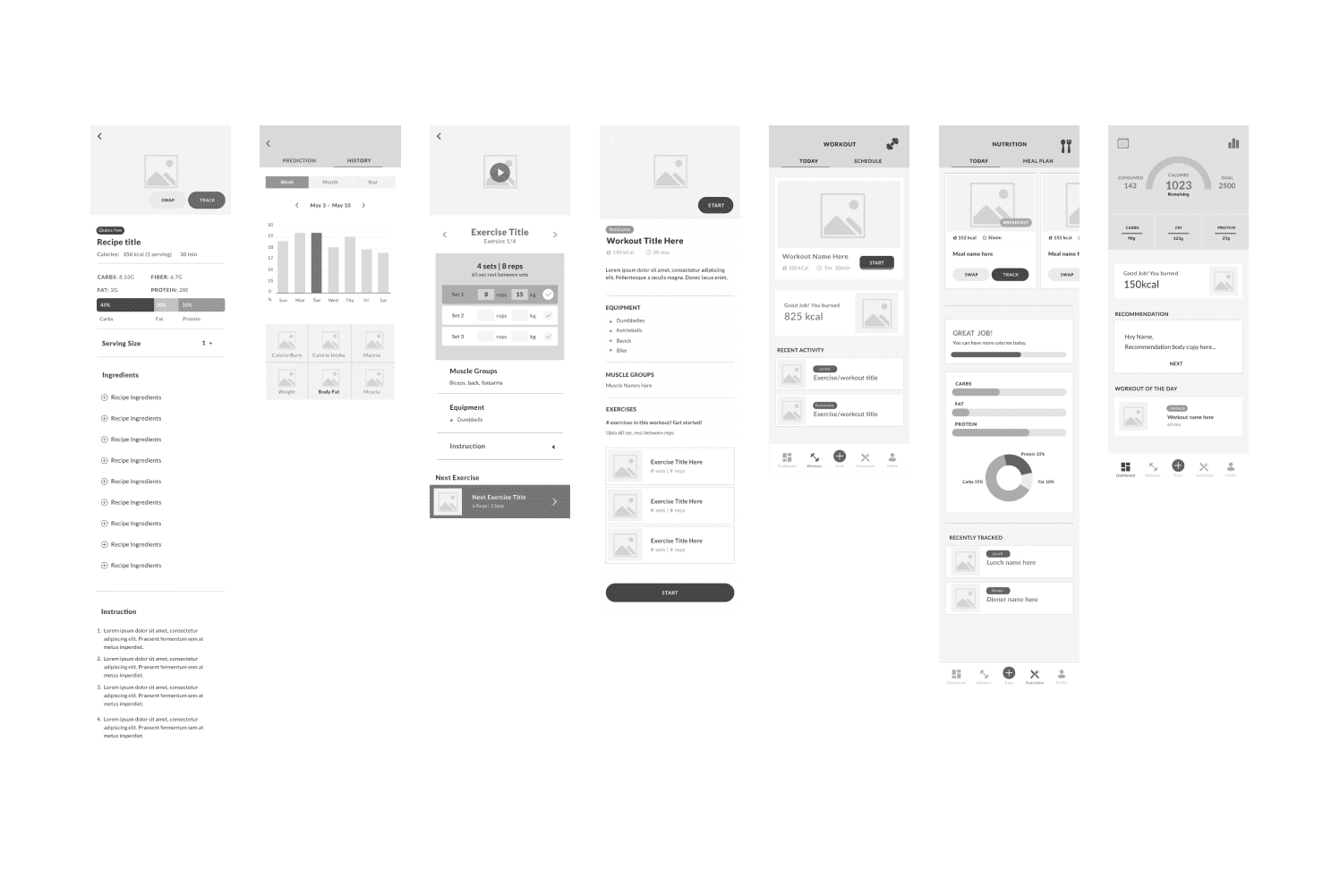
Wireframes served dual purpose: explaining app mechanics to developers and identifying development limits, while also enabling early user testing with 3 participants to validate the final concept.
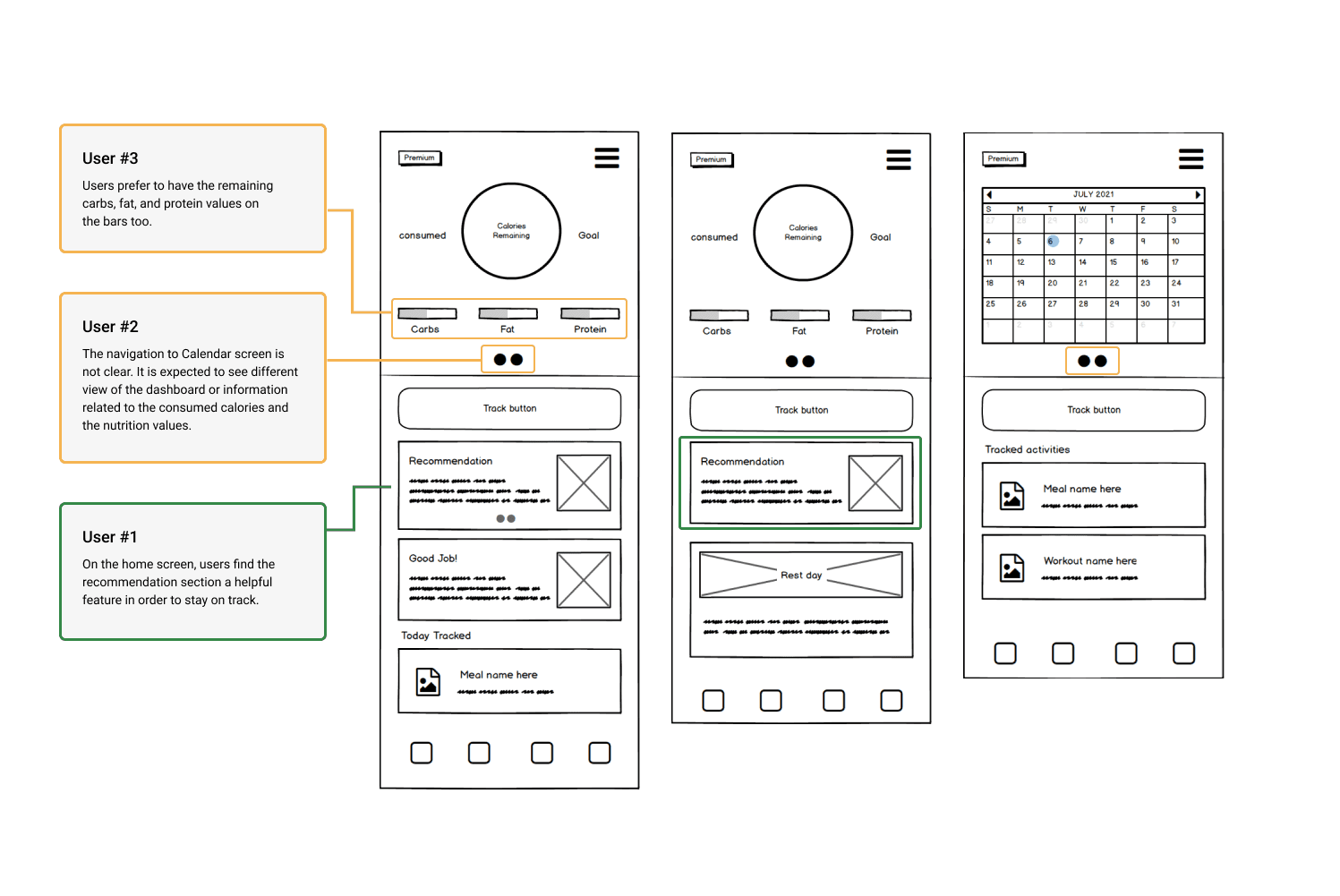
Low-fidelity wireframes of the core flows, used to align developers on mechanics and expose framework limits before any visual design.
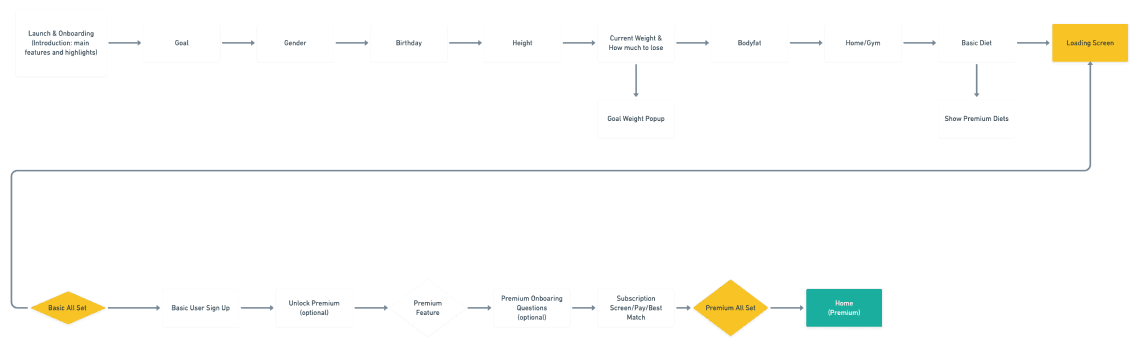
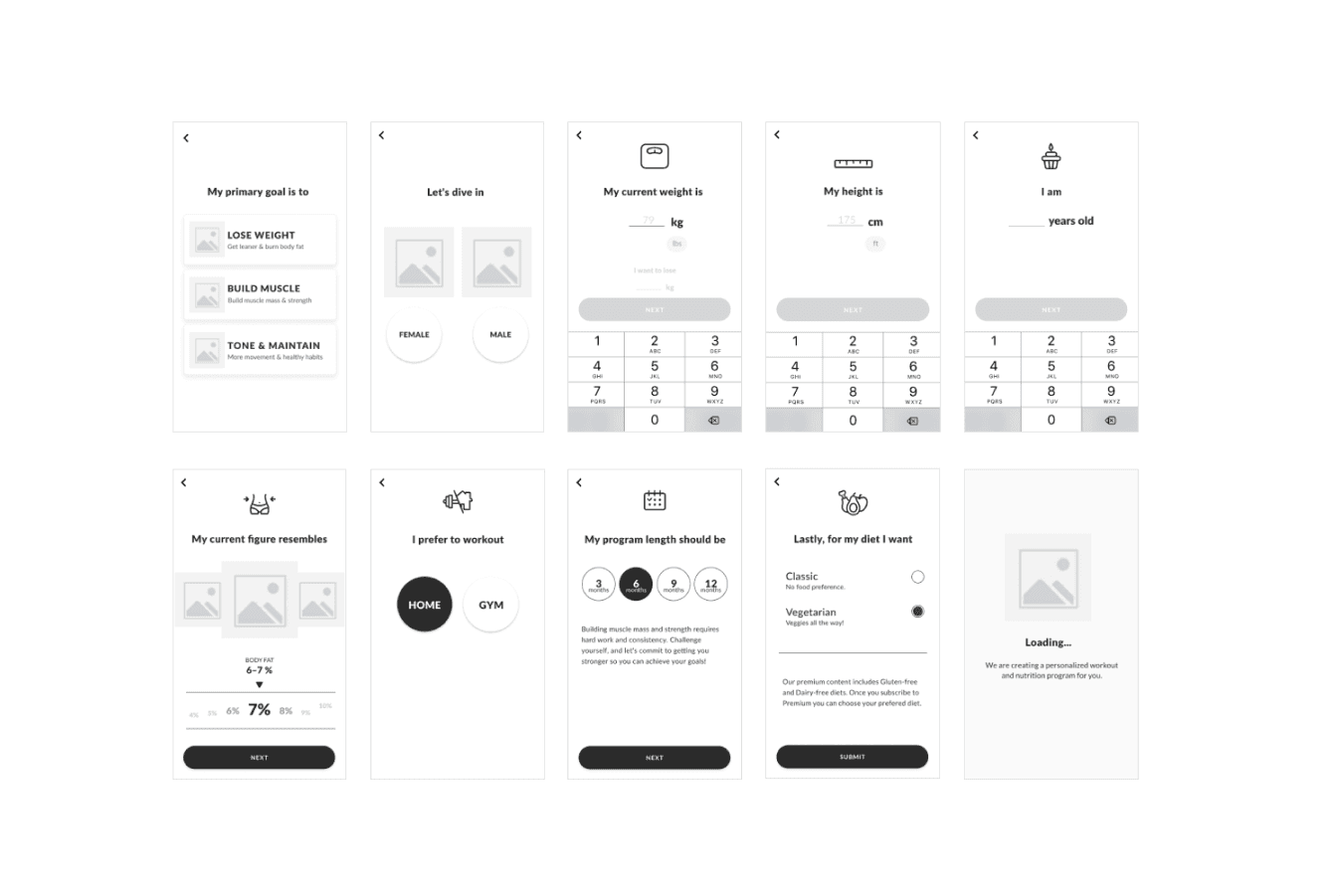
Detailed wireframes of the onboarding sequence, the basis for the 3-participant test that validated the flow before high fidelity.
Key Decision, Onboarding & Paywall Sequencing
“Earn the upgrade before asking for it.”
Onboarding was the highest-stakes flow in the app, it carried both profile setup and the premium subscription. The analytics showed users were dropping out here, so I broke a long, intimidating form into a progressive step-by-step sequence, asking one clear question at a time, and deferred the premium prompt until after users had seen a personalised result.
The trade-off
It pushes the paywall later, a near-term conversion risk, in exchange for users reaching the app's value before being asked to pay.
What I rejected
A front-loaded paywall converted a few impatient users but, in testing, killed trust for the overwhelmed majority the persona was built around.
04, Measure
Testing Until It Actually Works
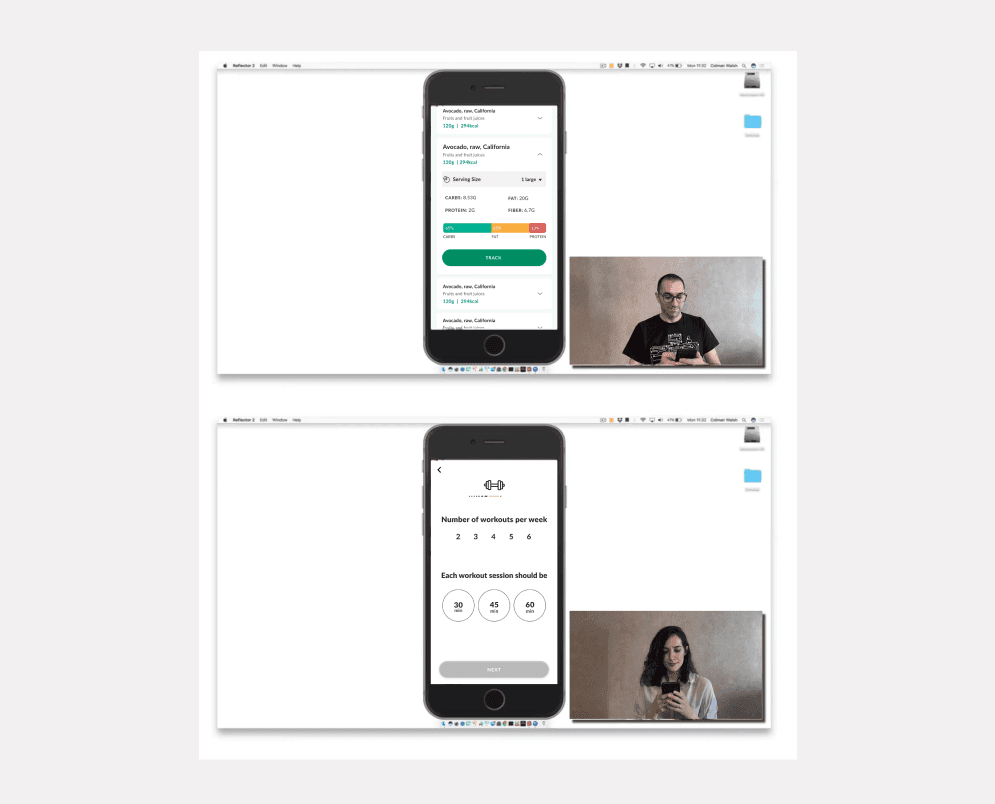
I validated each iteration with both in-site and moderated usability testing before it moved forward, confirming users could find features, complete tasks, and trust what they saw, rather than assuming the redesign worked.
Closing the loop, one example
In moderated sessions, testers hesitated on the meal-plan screen, unsure whether their inputs had saved. I added an explicit system-status confirmation and reworked the labels; in the next round the hesitation disappeared and task completion on that flow climbed.
Key Performance Indicators
CTR
Click Through Rate
Measured how effectively key CTAs drove user action across onboarding and core features.
CVR
Conversion Rate
Tracked the proportion of users completing target flows, from signup through to premium subscription.
Success Rate
Task Completion
Validated that users could complete primary tasks without confusion, errors, or abandonment.
DAU
Daily Active Users
Monitored day-over-day engagement to confirm that UX improvements translated into retained usage.
Analytics Platform
Kochava, a mobile attribution and analytics platform, enabled continuous analysis of user behaviour and identification of required improvements post-launch. KPI monitoring confirmed that design and business objectives were being met and surfaced the next iteration priorities.
05, Deliver
A Smarter, More Personal Fitness Experience
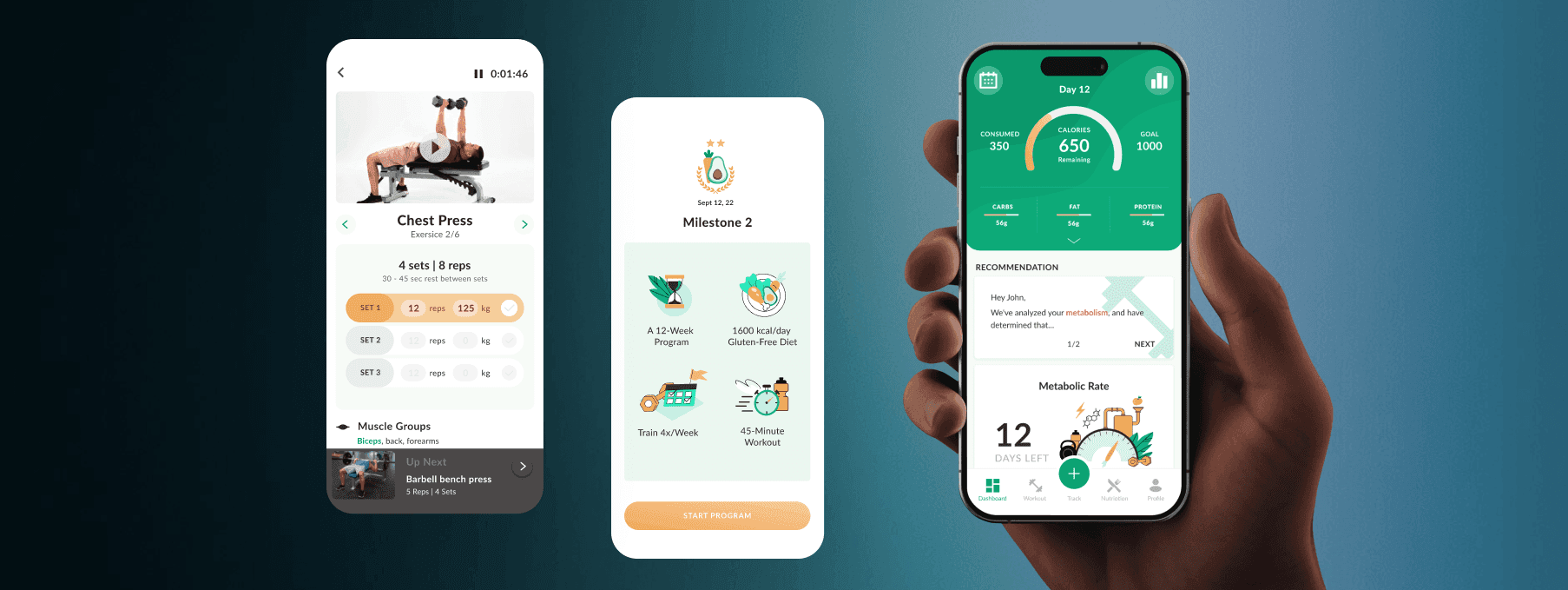
The redesigned FitMyLife app delivered a cleaner, more intuitive experience that put metabolic science in the hands of users in a way they could actually understand and trust. Clear flows, consistent UI, and adaptive personalisation replaced the cluttered, confusing original.
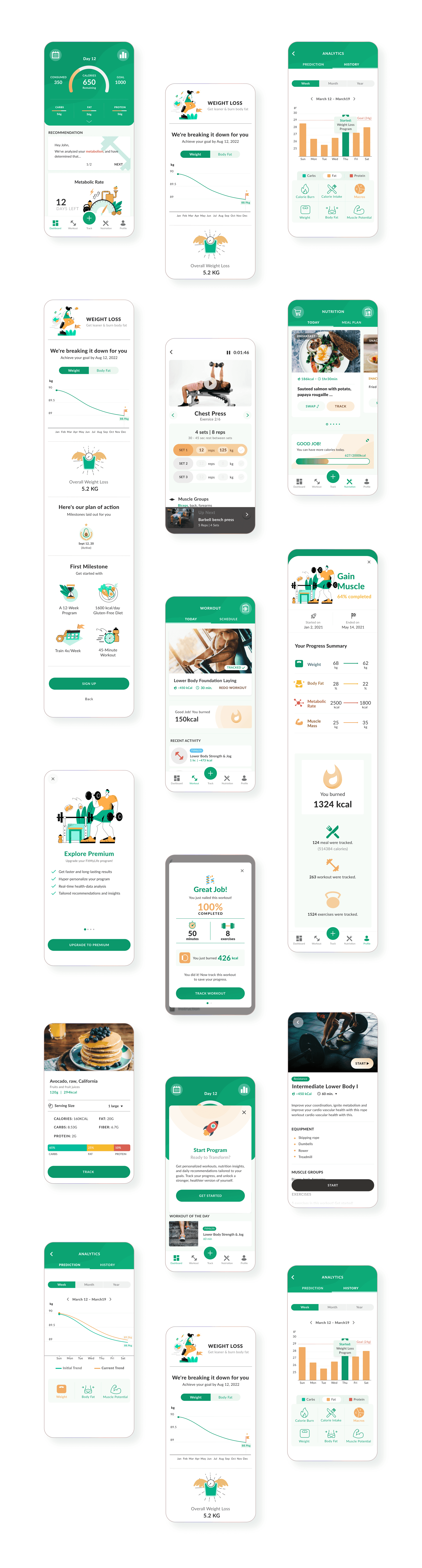
Final UI: the progressive onboarding, clearer system status, and consistent components that replaced the cluttered original.
Measured Impact
0%
Increase
in Conversion
0%
Increase
in Retained Users
0%
Increase
in Newsletter Subscription
0%
Decrease
in Loading Times
Tracked in Kochava against the pre-redesign baseline over the first post-launch cycle. Conversion and retained users were the primary targets; the loading-time reduction was a build-quality win I drove jointly with engineering while working within the framework constraint.
What I'd Do Differently
I'd instrument the funnel to isolate the redesign's effect more cleanly. The numbers moved in the right direction, but with overlapping changes shipping I can show correlation more confidently than causation, an A/B test on the onboarding sequence would have settled it.
I'd also push the technical-constraint conversation earlier. I designed around the framework's limits well, but raising the highest-impact constraints with engineering at kickoff, rather than discovering them mid-flow, would have widened the solution space on a couple of key screens.
“FitMyLife learns and adapts to user behaviour and body composition, the redesign made sure the experience was worthy of the science behind it.”